During a call
Write down an address, a reference number, or the next steps. Pin the note beside your document so you can keep referring to it.

CORNER NOTES FOR MAC
Click a tab to write. Pin a note beside your work, or tuck it away when you’re done. Corner Notes saves your changes on your Mac.
Keep it to notes, or add a calculator, timer, and study tools.
Checking download availability…
Apple silicon (M-series) · macOS 14 or later
See how the tabs work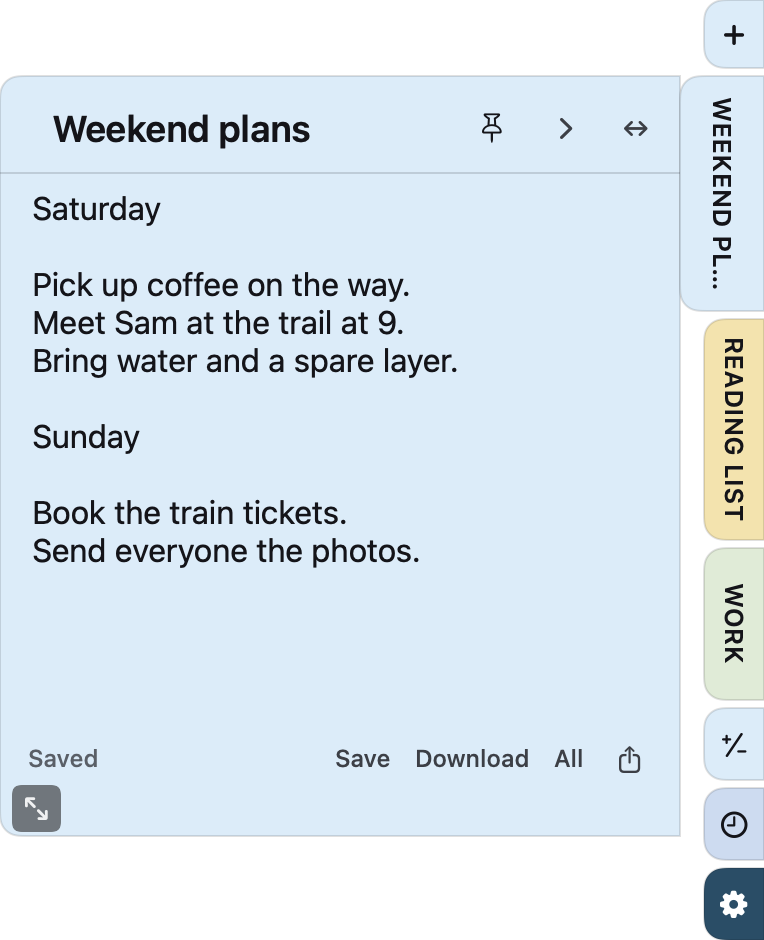
AT WORK, AT HOME, IN CLASS
Write down an address, a reference number, or the next steps. Pin the note beside your document so you can keep referring to it.
Keep your working notes beside a calculator. Open a formula, convert a unit, or look up an element while you study.
Give work notes and personal lists their own workspaces. Choose which tabs appear in each one, with up to four workspaces in total.
HOW IT WORKS
Hover over the edge marker to reveal your tabs. Keep them on the left or right.
Write in a note or open a tool. Use the + button to add another note.
The thumbtack keeps that note or tool visible. Settings lets you choose when the rest closes.
Drag a window’s resize handle when you need more room.
CHOOSE YOUR TABS
Turn on the tools you use in Settings. Leave the others out of your way.
Write, rename, and reorder notes. Pick your colors and fonts, export a note as text, or recover it from Recently Deleted.
Switch between simple and scientific arithmetic, finance calculations, graphs, statistics, matrices, probability, function tables, and numerical calculus.
Enable the Math & Science pack in Settings. Some equation and graph results use numerical approximations.
Add and check off tasks through Apple Reminders. Set a custom countdown, use the stopwatch, or record a voice note.
Take a screenshot, record your screen, or pick a color. Turn on text clipboard history if you want to keep recent copies close.
GETTING STARTED
The Mac download is coming soon. Here’s how you’ll install and use it once it’s available.
Download the disk image, open it, and drag Corner Notes into Applications. Then open the app.
A blank “Notes” tab opens on the right edge. Type your note there. Click + whenever you want another.
Pin a note beside your work, or let it close when you move away. Your edits save automatically on your Mac.
Where’s the app icon? Corner Notes lives in your menu bar, so it doesn’t add a Dock icon. Open Settings with the gear at the bottom of a strip.
QUESTIONS
Corner Notes runs on Apple silicon Macs (M-series chips) with macOS 14 or later. Check Apple menu → About This Mac. Intel, Windows, Chromebook, iPhone, and iPad downloads aren’t available.
Corner Notes is offered as a free download. Buying a coffee is optional and doesn’t unlock extra features. The download form asks for your name and email; news about new tools is a separate, optional checkbox.
Notes and voice recordings save on your Mac. Local backups and Recently Deleted are in Settings → Data. Notes don’t sync between Macs. Tasks use your Apple Reminders list and follow that list’s account settings.
You don’t need an account to use the Mac app. Writing notes and doing calculations don’t require microphone, screen, or Reminders access. Voice recording, screen capture, and the To-Do tab ask for their relevant macOS permissions when used.
Your notes save between launches. Pinned windows and calculator drafts are kept for the current session. Copy a result into a note if you want to keep it.
Share this website so they can get the official download. You can export and share your own notes. Resale and redistribution of the software require permission; see the license.
CORNER NOTES
For Apple silicon Macs running macOS 14 or later.